Have NetSuite? Use the CRM…It’s included.
One of the most understated NetSuite features is Customer Relationship Management. This article is not intended to be a comparison of NetSuite vs Salesforce or other CRM products in the marketplace, as there are numerous articles and blog posts on this subject. Generally, we find people to be very passionate about which CRM system is better. What is lost in the conversation is how best to manage a business so that there is only one version of customer truth.
NetSuite CRM is included in almost every NetSuite instance, but in our experience, almost no one buys NetSuite solely for CRM (although it can be licensed). The power of NetSuite CRM lies in its integration with every aspect of managing your business. Table stakes is a 360-degree view of your customer, but the real power is providing advanced visibility into real-time inventory levels, customer service issues, customer returns, vendor/product issues, upsell opportunities, etc. Every record in NetSuite can be included in a communication, task, or event. Your lead-to-cash process can be tracked entirely within NetSuite.
In this article, we present how CRM capabilities can leverage your NetSuite investment. NetSuite serves as your Single Source of Truth (SSOT) for all of your business metrics. Using NetSuite allows you to avoid integration with other CRM platforms and eliminates the hassle of different sources of customer, marketing, and sales data.
In this article, we will discuss the key attributes of NetSuite CRM:
- Marketing Automation
- Salesforce Automation with integrated commission calculations
- Relationship Management with customers, vendors, and partners
- Integration with all business processes
- Technologies to enhance your NetSuite CRM
- How to get started using CRM if you run NetSuite
NetSuite Marketing Automation
NetSuite enables multi-channel marketing campaigns to drive leads and additional revenue to your business. Key components of this automation include:
- Lead Capture
- Marketing Email Templates
- Marketing Campaigns
- Upsell Manager
NetSuite Lead Capture
NetSuite can capture leads in several ways. You can develop an online customer form that automatically generates a new lead, prospect, or customer record upon submission, depending on how you want to handle that form. ScaleNorth, for example, has 4 distinct contact forms embedded throughout our website and our landing pages.
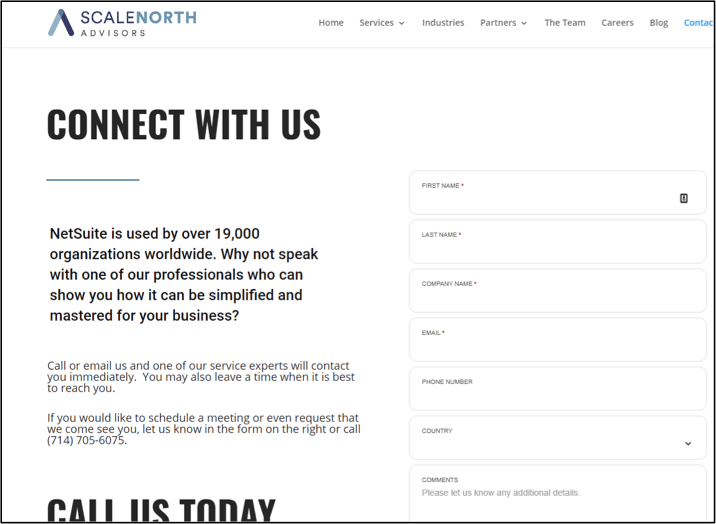
Once a user fills out this form on our site, our sales team is instantly alerted via email and a dashboard alert. Each lead form is assigned a lead source that indicates which campaign generated the lead. You should maintain this lead source information to tie revenue to campaigns. Accurate lead-source information provides insight into which campaigns generate the most leads.

Other methods for capturing leads in NetSuite include importing lead lists from CSV or XML files or integrating with third-party sources.
NetSuite Marketing Campaigns
You can create marketing campaigns in the form of email, direct mail, telephone marketing, print ads, or pretty much any channel you need or want to use. Since NetSuite is your ERP system, you can easily and accurately track the return on investment for your marketing activities.
NetSuite Upsell Manager
NetSuite’s Upsell Manager feature uses analytics to identify which items offer strong upsell opportunities and which customers you should target. Upsell Manager searches your customer transaction histories to recommend possible upsell items and item categories. It chooses these upsell items and item categories based on their correlation. The upsell manager also considers an item’s correlation and purchase rate (lift). Upsell Manager has a built-in NetSuite wizard to guide you through the setup process.
Salesforce Automation (SFA) with Integrated Commission Calculations
NetSuite offers integrated sales features that give you the control, flexibility, and accuracy to manage your sales team. NetSuite has integrated sales, commissions, forecast reporting, and pipeline management into a single, unified platform. Key features in NetSuite SFA include:
- Lead Management
- Setting and Measuring Quotas
- Managing Deals
- Pipeline Analysis
- Contact Tracking
- Sales commission calculation and tracking
- Integrated sales order workflows
NetSuite’s key differentiator is that it provides your sales team visibility into every aspect of your customer, including sales, support cases, contacts, inventory availability, order status, shipping status, payment and credit status, etc., to help you better serve your customer.
NetSuite Relationship Management with Customers, Vendors, and Partners
NetSuite not only provides a 360-degree view of your customers but also applies the same capabilities to managing vendors and partners. This is where NetSuite really differentiates itself from other CRM packages.
For every entity in NetSuite (Customer, Vendor, Partner, Employee), you track all the related activities for that entity.
Vendors:
- Request for Quotes
- Pricing
- Communications
- Time Tracking (contractors)
- Contacts
- Events
- Notes
- Financial information, payment history
- And much more
Since everything is tracked in NetSuite, there is a single source of truth for each entity type. You can empower your organization to serve your customers better than the competition by understanding everything related to each customer, down to the vendors involved in serving them.
Lastly, NetSuite has a really cool feature called Sticky Notes. StickyNotes lets you attach notes to entity records (and other record types) and keep track of your notes as well as others’ replies. You can communicate effectively with others by adding recipients to ensure that only specific people have access to your notes. Recipients are notified through email when you tag them in a note or when replies are added to the note. The note can be placed anywhere on the page just like a sticky note.

Integration with all Business Processes
Now this is where NetSuite CRM gets even more compelling. Every record in NetSuite has CRM functionality…really. Almost every record type – entities and transactions have a Communication tab to track all related communication, activities, notes, files, and support cases related to that record. Each transaction record relates to an entity record, so any CRM activity on the transaction is also shown on the entity record.

The power is that when a user views a customer or vendor, they can see all communication activity, follow-ups, support cases, tasks, and sticky notes to get the true picture of not only what is happening with that entity, but also any issues with related entities. Only NetSuite allows this from a CRM perspective because every transaction must be entered and tracked – sales, purchases, support cases, etc.
Technologies to enhance your NetSuite CRM
Several additional technologies can be licensed and integrated to augment NetSuite’s CRM capabilities. One such technology that we use is Celigo’s CloudExtend Outlook for NetSuite and CloudExtend G Suite for NetSuite. Both products let you integrate your email with NetSuite and view customer and transaction data directly in Gmail or Outlook.

- Attach emails with one click to NetSuite records directly from Outlook
- Attach Calendar events to NetSuite records
- View your NetSuite customer and transaction data directly within Outlook
- Create and edit NetSuite records directly in Outlook
- Upload file attachments
- Users have access to all their NetSuite roles. CloudExtend uses these same permissions

- Attach emails and file attachments to NetSuite records directly from Gmail
- CloudExtend pre-populates suggested NetSuite records in real-time when you view an email
- Search your NetSuite Records just like you use global search within the NetSuite interface
- Synchronize Google and NetSuite calendars automatically
- Attach emails and file attachments to NetSuite records directly from Gmail
- Certified Built For NetSuite (BFN)
How to get started using CRM if you run NetSuite
If you are currently running NetSuite, I recommend reviewing the documentation links above and leveraging a Sandbox account to explore the CRM capabilities. It took me a bit of trial and error to figure out some of the nuances, particularly with Marketing Campaigns, Emails, and Newsletters.
Some other CRM packages on the market may be perceived as more user-friendly, but if you have NetSuite or are considering upgrading your ERP to NetSuite, our advice is to use NetSuite CRM. We have integrated NetSuite with other leading CRM packages with great success, but having all your business contact information in one place greatly simplifies and enhances visibility into your operations, providing that Single Source of Truth.
Please let us know if we can help in any way.