

The NetSuite Outsourced Manufacturing feature provides companies with better management for the production of their assemblies that were processed by their outside vendors. With this feature, both purchasing, consumption, and production processes are recorded in NetSuite, which allows better visibility into the production process.
Outsourced Manufacturing Setup in NetSuite
Here are the steps required to set up the Outsourced Manufacturing Feature in NetSuite:
1. Enable the following required features by navigating to Setup > Company > Enable Features page.
- Advanced Bill of Materials feature

- Outsourced Manufacturing feature

2. Associate the Outsourced Location with a Vendor record.
Upon enabling the Outsourced Manufacturing feature, the user needs to associate their Outsourced Location with their Vendor records.
- View and edit your Outsourced Vendor record.
- In the Outsourced Manufacturing tab, select the related Outsourced Location.
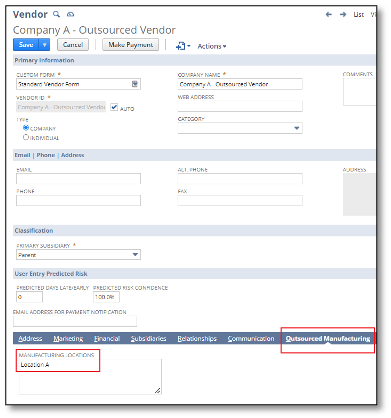
If the user is unable to see the Outsourced Manufacturing tab, the preferred Vendor form will need to be customized to add this tab.
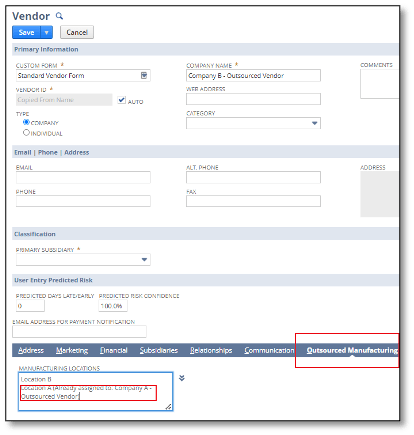
Also, an Outsourced Location can only be associated with one Vendor record, but a Vendor record can have multiple associated Outsourced Locations. When adding an Outsourced Location that is already associated with another Outsourced Vendor, there will be a note indicating such information, and the user will also be prevented from saving the Vendor Record:

3. Create an Outsourcing Charge Item.
User will need to create an Outsourcing Item, which serves as the charge or rate imposed by Outsourced Vendors to produce one (1) unit of an outsourced assembly item.
- Navigate to Lists > Accounting > Items > New and select either a Service for Purchase or Other Charge for Purchase Item type.
- Set a name for the item.
- In the Purchasing tab > Cost Category field, select Outsourcing Charge.
- In the Purchasing tab, set the charge rate in the Purchase Price field.
- In the Accounting tab, set the Expense account used to record the charge/rate from Vendors when receiving the Vendor Bill.
- Click Save.
4. Update BOM Revision Records.
- View an Assembly Item Record.
- In the Manufacturing tab, click the link for the Assembly’s Revision.
- In the Bill of Materials Revision page, click Edit.
In the Components tab, add the Outsourcing Charge Item created in #3 above. NetSuite will automatically set the quantity for the Outsourcing Charge Item to one (1) quantity. The quantity for the Outsourcing Charge Item is not editable.

- Click Save.
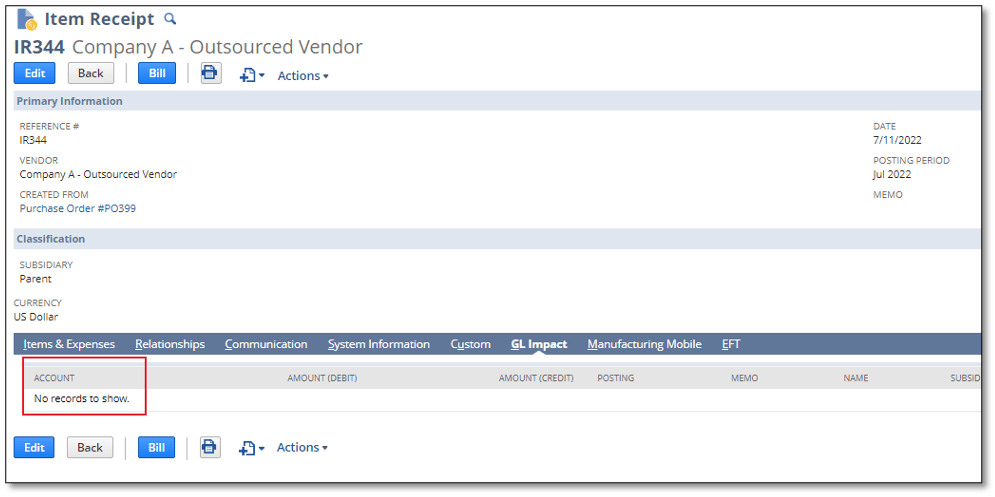
Upon saving the Item Receipt record, a corresponding Assembly Build transaction will be created for the related Work Order. Note that in the Item Receipt record, no GL impact is expected as the GL impact related to the increase of the Assembly, decrease in components, and recording of outsourcing charge, will all be recorded in the Assembly Build record.
Wrapping Up
As a highly accredited NetSuite Solution Provider, ScaleNorth is well-positioned to help you with the full scope of your NetSuite customization needs. If you require more NetSuite assistance, contact ScaleNorth today.
Check out more Suite Guides:
- How to Partially Bill a Purchase Order with Expense Categories
- How to Determine if a Native NetSuite Page is Scriptable
- How to Show the Balances Per Month in The Consolidated Balance Sheet
- How to Fix XML Ampersand Error in NetSuite
- How to Conduct The First Bank Reconciliation After Trial Balance Imports