
In today's NetSuite guide, we’re going to discuss how to conduct the first bank or credit card reconciliation after trial balance imports.
Bank Rec Cutover
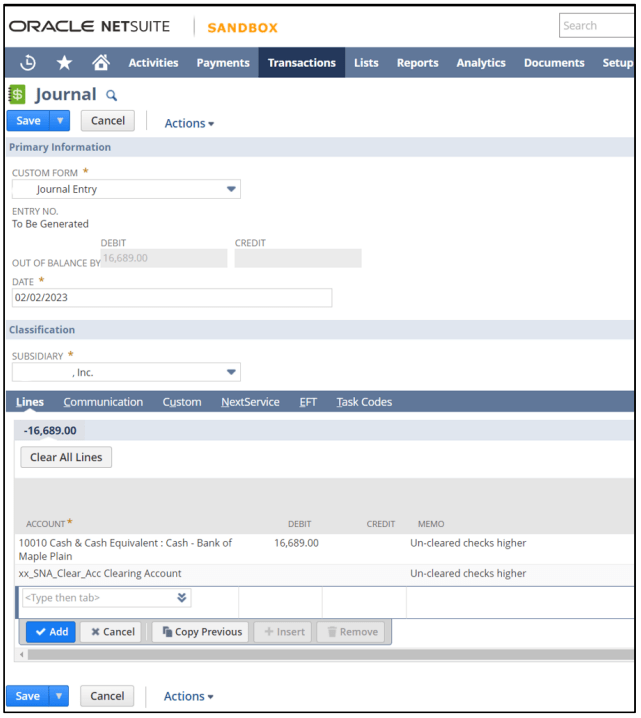
1. Load Last Trial Balance Journal for data migration – Make sure you have loaded the go-live historical balance JE before starting this step.
2. Create a Journal to offset (‘reverse’) the impact of the Uncleared Checks and Deposits in Transit to be entered in steps below. This can be accomplished in one summary journal; the amount equals the sum of all uncleared checks minus the sum of deposits in transit. Date should be the day prior to cutover.
If the Un-Cleared Checks Amount is greater than the Deposit in Transit
DR Bank Account
CR - Clearing Account
If the Deposit-in-Transit amount is greater than the Uncleared Checks Amount
DR - Clearing Account
CR - Bank Account
3. Conduct a Bank Reconciliation (Match Bank Data) for the date prior to go-live.
4. In the ‘Add Charges’ section, enter each individual check (data migration checks) to the Clearing account. Date should equal the day before cutover.
5. In the ‘Add Deposits’ section, enter each deposit to the Clearing Account. Date should equal the day before cutover.
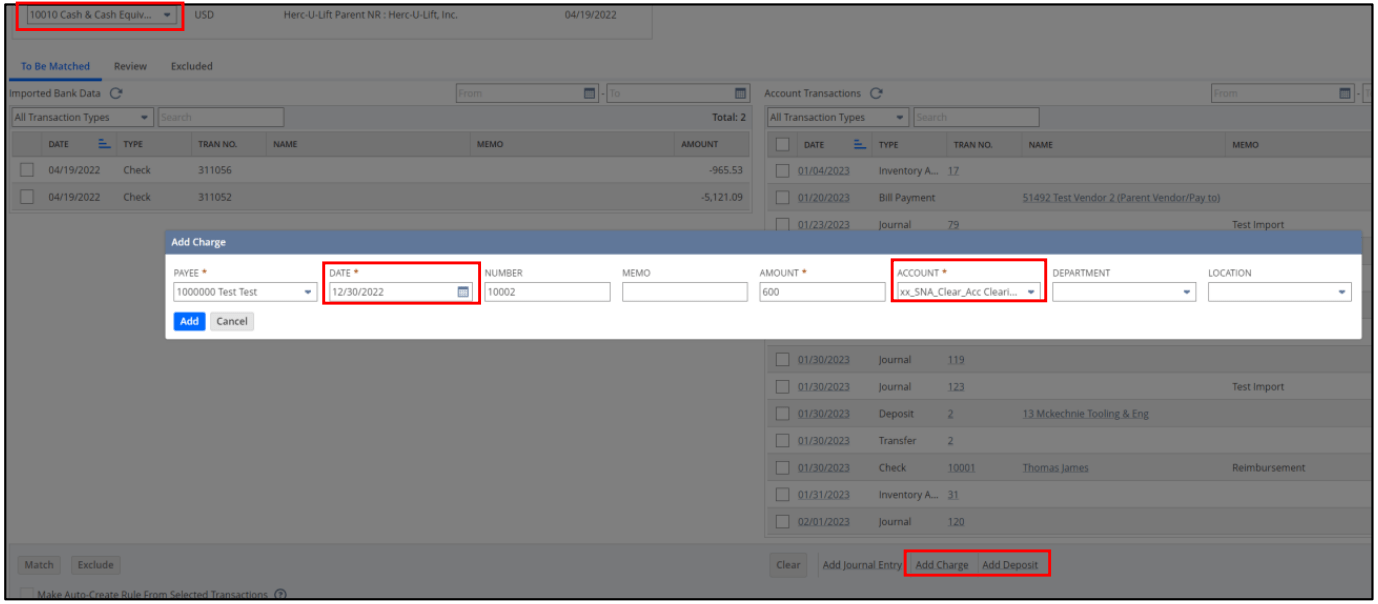
6. Clear the TB Import Transaction as well as the reverse entry created in Step 2.
7. For the newly added in-transit transactions added in steps 4 and 5:
IMPORTANT: Leave the Data Migration checks and Deposits from Step 4 and Step 5 ‘unmatched’.
8. Complete the pre-go-live reconciliation by doing a reconciliation of the account statement transaction.
9. In the reconciliation account statement, provide the following details:

10. The Difference field should be zero between the bank statement balance, the import balance, and the reverse entry. The Uncleared Checks and Deposits are ready to be reconciled at a later date.
11. Save. That's it. That's how you conduct the first bank or credit card reconciliation after trial balance imports in NetSuite.
As a highly accredited NetSuite Solution Provider, ScaleNorth is well-positioned to help you with the full scope of your NetSuite customization needs. If you require more NetSuite assistance, contact ScaleNorth today.


