
In today's NetSuite guide, we'll discuss how to perform bank reconciliation in NetSuite.
If the business is not currently using the Bank Feeds feature to auto-import bank transactions in NetSuite, bank reconciliation can begin by importing them from a CSV file.

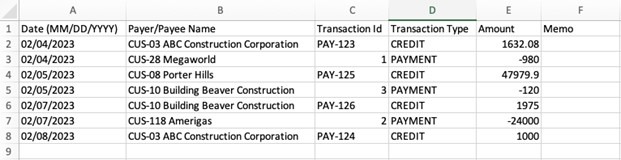
Select the bank account in the Account field. Click "Import".

This upload status message will show to track the status. Click the "Track your status" link.

If the import status shows "Failed", check the reason and update the CSV template.
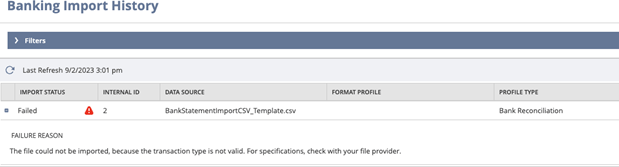
If the import status shows "Completed", the upload was successful, and you can proceed with the reconciliation.

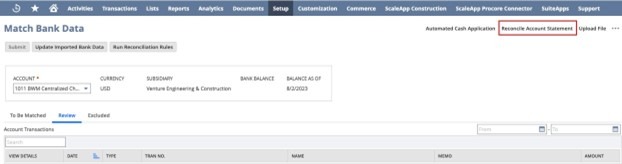
On the NetSuite Match Bank Data page, you can compare bank lines and account transactions imported into NetSuite. Navigate to Transactions > Bank > Match Bank Data.
You can take the following actions:

Select the account to be matched. Review the matched bank transactions in the "Review" tab.
If you need to exclude the matched transactions, click the "Matched" link on the line; a pop-up will offer to undo the matching. Click "Undo Match".

Click on the checkbox of each line to be matched. Click the "Match" button.


Enter the required information, such as payee, date, number, memo, amount, account, and dimensions of the entry.

Once done, the entry will show in Account Transactions. Click the checkbox and "Clear".
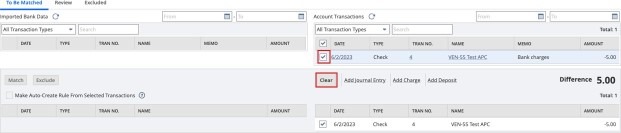

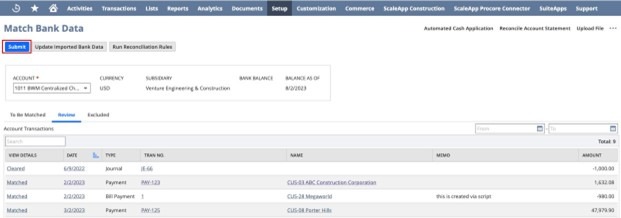
The Summary area will show how different it is from the reconciliation. The goal is to have zero difference, but the reconciliation can still be submitted even if there are differences.

This pop-up message will appear to show the close date for the last reconciliation and its ending balance.

To generate the reports, navigate to Reports > Banking/Budgeting > Reconciliation > Detail. This NetSuite Bank Reconciliation Report can be generated and exported as CSV, Excel, DOC, and PDF files.


Completing your bank reconciliation in NetSuite is crucial to ensuring your cash balances are reconciled and balanced.
As a highly accredited NetSuite Solution Provider, ScaleNorth is well-positioned to help you with the full scope of your NetSuite customization needs. If you require more NetSuite assistance, contact ScaleNorth today.
Bank reconciliation ensures your financial statements are accurate and supports proper internal controls, enhancing audit readiness by verifying financial data. It reduces manual reconciliation errors, improves audit-trail compliance, and helps finance teams make better decisions about customer payments, bank fees, and overall cash management.
Yes, NetSuite supports automated workflows to streamline account reconciliation. Automated reconciliation reduces manual effort, data entry, and human error when handling high transaction volumes, while ensuring accurate journal entries in the general ledger. You can also utilize third-party tools like ZoneReconcile, an account reconciliation software, to further streamline and automate the bank reconciliation process.
The NetSuite Account Reconciliation module provides a user-friendly solution for finance teams to manage accounts receivable, accounts payable, credit card statements, and other accounts. It offers real-time visibility into the financial close and month-end and period-end close process, reducing time-consuming manual tasks.
With automated reconciliation, intelligent matching rules, and integrated workflows, NetSuite accelerates month-end processes, ensures timely account reconciliation, and improves the accuracy of financial reporting.
Yes, NetSuite can reconcile credit card and bank statements, manage high transaction volumes, and provide real-time insights into cash flow and other metrics.
Unlike QuickBooks, which requires significant manual reconciliation, NetSuite provides automated reconciliation, supports role-based access, and integrates with other financial management processes, giving teams real-time visibility into financial records.
By integrating workflows, matching rules, and automated reconciliation, NetSuite reduces manual effort, prevents misstatements and discrepancies, and ensures accurate financial records for decision-making.
NetSuite can reconcile bank accounts, credit card statements, accounts receivable, intercompany transactions, and other modules within the financial management system, supporting both internal controls and audit trail compliance.


