

In today’s NetSuite guide, we’re going to discuss how to issue a credit memo in NetSuite.
Creating a Credit Memo in NetSuite
A Credit Memo record is a transaction that decreases the amount a customer owes you. A credit memo may be created from a Return Authorization or a stand-alone record. If created from a Return Authorization, the Credit Memo would have no inventory impact; however, creating a stand-alone credit memo would affect your inventory.
Here are the steps to issue a Credit Memo:
- Go to Transactions > Customers > Issue Credit Memos
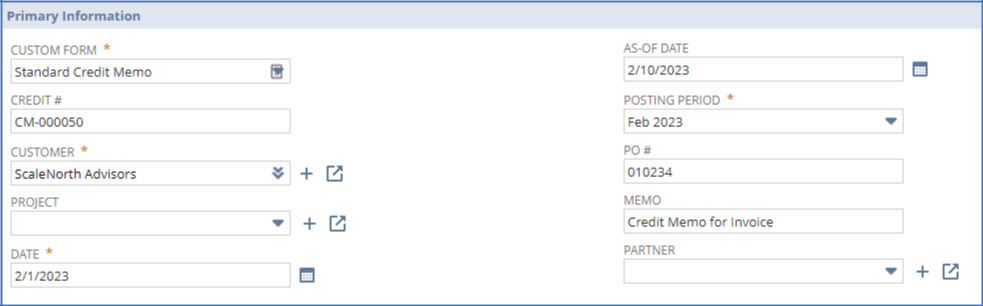
- Under Primary Information:
-
- In the Custom Form field, select the credit memo form you want to use.
- Select the customer you are crediting.
- Accept today’s date, or enter another.
- If you use accounting periods, select the posting period for this credit.
- Enter the customer’s original purchase order number.
- Enter a memo that will appear on the 2-line Accounts Receivable register.
3. Under Classification, select a subsidiary, department, class, and location you want this Credit Memo record associated with.

4. On the Items subtab, enter information about each item that will be credited, and click Add after each.

5. Select the billing address for the customer on the Billing subtab.

If not selected, the default billing address is displayed in the Bill To field.

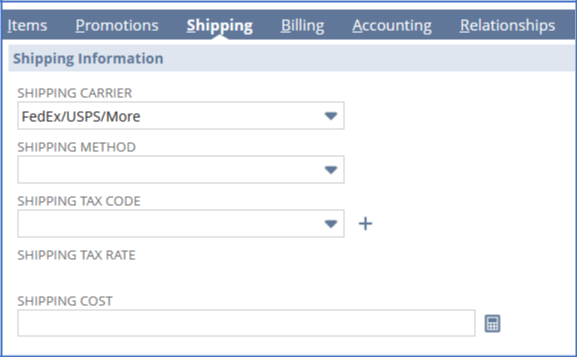
6. Enter the shipping details on the Shipping subtab.
7. Click Save. That’s it. That’s how you issue a credit memo in NetSuite.
Wrapping Up
As a highly accredited NetSuite Solution Provider, ScaleNorth is well-positioned to help you with the full scope of your NetSuite customization needs. If you require more NetSuite assistance, contact ScaleNorth today.
Check out more NetSuite guides:
- How to Create a Dashboard in NetSuite
- How to Bypass Location Limits
- How to Do Bank Reconciliation
- How to Make a Saved Search Public
About the Author
Kristine Belgado is an experienced CPA with a demonstrated history of working in ERP implementation for NetSuite and Oracle Fusion. She is skilled in ERP Implementations, business process engineering, and gap analysis. Kristine is a strong accounting and information technology professional who graduated from Batangas State University with a Master’s in Business Administration.
Kristine holds the NetSuite Administrator, SuiteAnalytics, ERP Consultant, Financial, and SuiteFoundation credentials.