
First, use NetSuite global search prefixes to narrow the search to records of one type by adding a prefix to the search keyword.
This will also speed up the search and eliminate the return of irrelevant records. A search prefix is made up of all or some of the letters of a record type, plus a colon or a caret.
For example, if you are looking for a specific customer record, you can type in C-U-S, then a colon, and then enter the keywords. This will list down all the records that start with the keyword that you have entered.
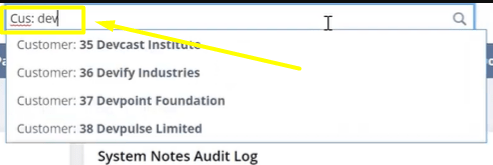
You can also type in C-U-S and a caret and then type in the keywords, and it will show the same result.

Use keywords that are at least three characters long to return expected results when searching over a large amount of data.
Note: Keep in mind to limit the keyword lengths to 32 characters or less, otherwise it may cause a failure to find matching results.
Use the % sign as a wild card in numeric and text keywords. By default, the NetSuite global search returns exact matches only unless you add the percent sign wildcard. This is also helpful in avoiding returning extremely larger results sets for purely numeric keywords. If you enter ‘Inv:33’, only an invoice with the invoice number 33 is returned. If you enter ‘Inv:33’ and then add the % sign, all invoices with numbers starting with three three are returned.
Now, if you add the % sign before the keyword, any invoices containing ‘33’ anywhere in the record are returned.
You can also use OR as a separator in keywords to search for multiple text strings. For example, you are looking for records that have USB or VGA in their name. You can type in % sign USB, then type in or, and then % sign VGA. It will show all the records that have USB or VGA in their names. You can click to show more results and see the complete list.
Another tip is for searching inactive records. By default, inactive records are not searchable in the NetSuite global search. You can include inactive records in the search results by appending a plus symbol to your keywords.
For example, if you are looking for an inactive customer, you can type in C-U-S, then enter the keyword. You will notice that there’s no result for this specific keyword. Now, when I add a plus sign after the keyword, it shows a result that pertains to an inactive record.
As a highly accredited NetSuite Solution Provider, ScaleNorth is well-positioned to help you with the full scope of your NetSuite customization needs. If you require more NetSuite assistance, contact ScaleNorth today.
Leily Jamin is a Certified Public Accountant with almost seven years of work experience in Public Accounting practice and Oracle NetSuite. She joined Oracle NetSuite in 2019 as part of the NetSuite Customer Support team. She performed complex troubleshooting and analysis to provide relevant and feasible solutions to customers’ concerns.
Leily is now working as a NetSuite Consultant at ScaleNorth, providing best practice advice and solution design that is best for the customers. Leily holds the NetSuite Administrator, SuiteFoundation, Financial, and SuiteAnalytics credentials.


