
One of the common problems encountered by companies that track inventory in their NetSuite accounts is when the item quantity on hand results in a negative inventory number. In this Suite Guide, we'll show you how to prevent negative inventory in your NetSuite account by using the Enhanced Validations and Defaulting SuiteApp.
In the item sample below, the initial quantity on hand was 10. However, a standalone invoice was entered for 12 quantities, resulting in a negative two (2) quantity on hand.


This usually happens when inventory transactions, such as item fulfillments, standalone invoices, or negative inventory adjustments, are entered for quantities greater than the item's on-hand quantity. While there are best practices to prevent negative inventory or underwater sales in your NetSuite account, as discussed in SuiteAnswers 28074 – Avoiding Underwater Inventory, the Enhanced Validations and Defaulting SuiteApp (Bundle ID = 213294) offers NetSuite users a supplemental approach to validating transactions to prevent negative inventory.
The following are the main features of this SuiteApp that can be used individually or in combination with the other features:
The Enhanced Validations and Defaulting SuiteApp is a public bundle that can be installed in your NetSuite account without purchasing or requesting provisioning.

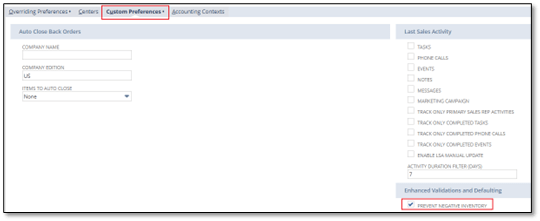
In this article, we will illustrate the setup and how the Negative Inventory Validation works to prevent negative inventory in your NetSuite account:


3. Enter an Invoice for 15 quantities. Note that the pop-up warning indicates that the stock is insufficient to create the invoice. In this illustration, the user will be prevented from adding the line item to the invoice because the entered quantity exceeds the item's on-hand quantity.
As a highly accredited NetSuite Solution Provider, ScaleNorth is well-positioned to help you with the full scope of your NetSuite customization needs. If you require more NetSuite assistance, contact ScaleNorth today.
Check out more Suite Guides:


